Tracking Your Progress
Knowing where you stand is a big part of staying motivated. The Statistics tab -- the middle tab at the bottom of the screen -- is your personal learning dashboard. It gives you an honest look at how much you've been practicing, how many words you've learned, and whether you're building a consistent habit.
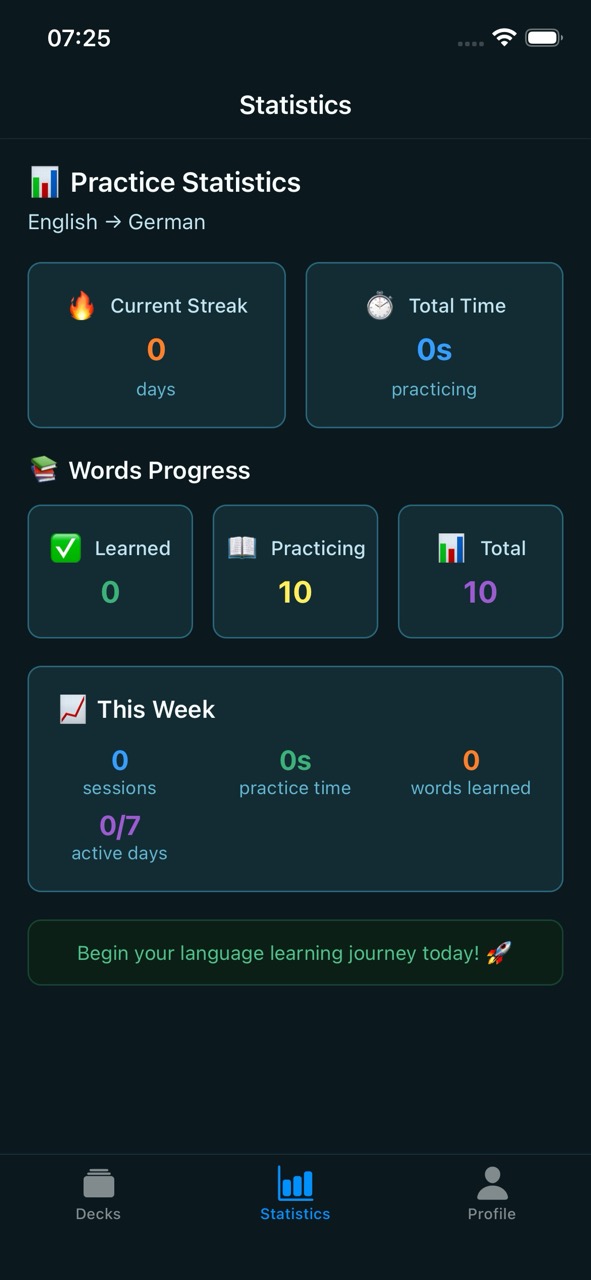
What you'll see
Your progress shows two numbers:
- Current streak -- how many days in a row you've practiced. Every day you do at least one practice session, your streak grows by one. Miss a day and it resets to zero. Streaks are a simple but powerful motivator -- once you get a streak going, you won't want to break it.
- Total time -- your accumulated practice time across all sessions. The timer only counts active practice; it pauses when you leave the app or switch to something else. This number is a good way to see how much real effort you've put in over time.
Words shows how many words you have in progress, split into those you've learned (fully mastered) and those you're still practicing. This gives you a clear picture of how far you've come and how much is left.
Exercises shows how you're doing in fill-in-the-blanks exercises: how many exercises you've done, your accuracy (the share of blanks you filled in correctly without a hint), and a bar that splits your answers into correct, with hints and missed. Until you've done your first exercise, this section invites you to try one.
This week is a snapshot of the last seven days. It shows how many practice sessions you've completed, your practice time, how many words you learned, and your active days out of 7, with a strip of dots for the days you practiced. It's a quick way to check whether you're keeping up with your goals.
Stats are per language pair
If you're learning more than one language, your statistics are tracked separately for each language pair. The flags in the top-left corner show which language pair you are looking at; tap them to switch to another pair. This way your German progress doesn't get mixed up with your Spanish progress.
Why streaks matter
Research consistently shows that short, regular study sessions are more effective than long, irregular ones. Even ten minutes a day adds up fast. The streak counter is there to help you build that daily habit. Don't worry about marathon sessions -- just show up every day.
A note for parents
The Statistics tab is a great place to check in on your child's learning without hovering. You can see at a glance how often they're practicing, how many words they've learned, and whether they've been consistent. It's all right there in one screen.